


Venmo
4.0357.03K Reviews
App Specs
- Version
- 26.12.0
- Updated On
- License
- Free
- Downloads
- 50,000,000+
- Developer
- Venmo
- Categories
- Finance
- Platform
- Android, iOS
Screenshots

 Analysis by AppCompare
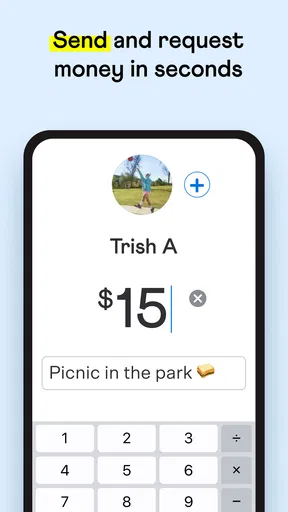
I find Venmo most useful when a payment needs to happen right now and both people have a reliable connection. Paying a friend back for lunch is a small task, but it can become awkward if nobody has cash or wants to work out change. A phone-based transfer makes that moment easier, provided the app can connect and you have the right person selected.
That network dependence is worth keeping in mind. Venmo is a finance app from Venmo, and its central job is moving money between people, so I treat an active connection as part of the payment process rather than an optional extra. I would not start a transfer while stepping into an elevator or relying on a weak signal, then assume it has gone through. I check the app’s status before telling someone they have been paid.
When the connection is part of the payment
A dependable connection matters most when I am sending money in a hurry: settling a shared meal, paying my share of a ride, or contributing toward a group gift while everyone is still together. The convenience comes from completing the exchange on a phone instead of hunting for cash or asking someone to remember a small debt later. But convenience depends on being able to open the app, identify the recipient, and see the result of the transaction.
For that reason, I think of Venmo as a good choice for planned, everyday payments—not as a substitute for having a backup when a payment is urgent. If the network is slow, I pause rather than tapping repeatedly. Repeating an action before the first attempt has clearly resolved can make it harder to tell what happened and risks creating confusion about whether a payment was sent once or more than once.
Useful on the move, with a little care
Venmo fits naturally into mobile situations: splitting a restaurant bill before the group leaves, reimbursing a roommate for a shared purchase, or sending a friend your part of a present. It is especially convenient when the other person is right there and can confirm that you selected the correct account. I find that quick confirmation more useful than rushing through the last step while distracted.
Before sending, I take a moment to check the recipient and the amount. That is a practical habit in any payment app, but it matters here because a familiar name or profile can be easy to choose too quickly in a busy setting. If I am paying someone I have not dealt with before, I would verify their details directly with them instead of relying on a guess or a rushed search.
If a transfer does not look complete
When a payment seems stuck, my first move is to stop and check the app rather than immediately trying again. I look for a clear transaction result and, if the other person is nearby, ask whether they can see the payment. This simple pause is more sensible than treating a slow screen as proof that nothing happened.
Worth Reading Before You Choose

Flipboard Shows What News Apps Must Do Beyond the Feed

Switching to Android Auto Means Rethinking Your Driving Routine

Google Calendar Makes a Crowded Week Easier to Manage

Ludo King Makes the Most of the Minutes Between Plans

Baby Panda World Brings Quick Play to Modern Phones, but Its Game Library Feels Busy

ESPN’s Live Game View Makes Following Close Games Easier
A poor connection can also make a payment feel more stressful than it needs to be. I would wait until I have a steadier connection before starting, especially if the transfer is time-sensitive. If the app does not give me a result I understand, I avoid promising that the money has arrived until I can confirm it. That is a useful distinction: sending a payment and knowing the recipient has received it are not always the same moment from a user’s point of view.
Using less data and avoiding rushed mistakes
If I am trying to conserve mobile data, I use Venmo for the payment itself and avoid lingering in parts of the app that are not relevant to the task. The social feed can make the experience feel more conversational, but I do not need to browse it every time I am settling up. Keeping the task focused also helps me pay attention to the recipient and amount instead of tapping through screens on autopilot.
For recurring everyday situations, I find it helpful to settle shared costs while the details are fresh. If a friend buys snacks for a group, paying my portion soon after avoids the familiar “I’ll get you later” problem. For a larger shared expense, though, I would agree on the amount first and make sure everyone is using the same figure. A payment app can move money; it cannot resolve a disagreement about what each person owes.
Venmo is free to download, and the app is rated for Everyone. Its average rating is 4.1 from around 877,000 ratings, with roughly 343,000 written reviews and over 50 million installs. Those figures suggest it is a familiar option for many people, but they do not remove the need to check that the people you pay are using it and that the app suits your own habits.
The app’s version is 10.78.1, and it runs on operating systems from version 8.0 onward. It first arrived on May 17, 2010, so this is an established service rather than a new experiment. I would still keep the app updated through the usual app-store process and make sure my phone’s own security settings are in order; a payment app is only one part of keeping an account and device protected.
Have you ever found yourself in an awkward situation where you owe your friend for dinner, but you don't have cash on hand? Enter Venmo, your new best friend for quick and easy money transfers. Let’s dive into what makes this app a must-have on your smartphone!
What Is Venmo All About?
First off, Venmo is a peer-to-peer payment app that makes it super simple to send and receive money from friends and family. Owned by PayPal, it's like having a virtual wallet right in your pocket. Whether you’re splitting a bill or chipping in for a gift, Venmo has got you covered. Just link it to your bank account or debit card, and you're good to go.
Setting Up Your Account
Setting up Venmo is as easy as pie. Just download the app from the App Store or Google Play, and within minutes, you’ll be ready to send or receive cash. You’ll need to verify your phone number and email, and voilà! You’re ready to roll. It’s as simple as sending a text message.
Features That Make Venmo Stand Out
One of the coolest features of Venmo is its social feed. Yes, you heard that right! You can like or comment on transactions, which adds a fun twist to the otherwise mundane task of money transfer. Plus, you can choose who sees your transactions, making it both fun and secure.
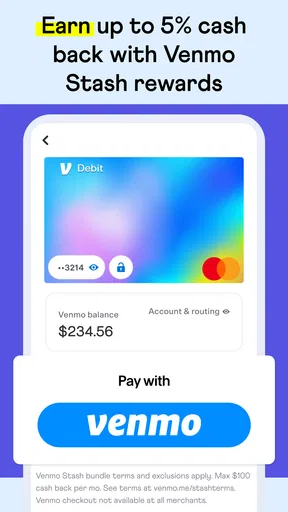
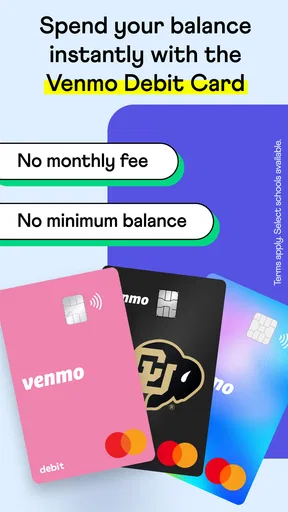
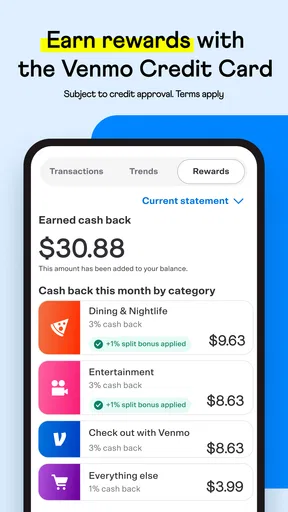
Another feature worth noting is the Venmo card. This physical card lets you use your Venmo balance to make purchases at any retailer that accepts Mastercard. It's a handy option for those who like to keep their spending separate.
Why You’ll Love Using Venmo
What makes Venmo truly shine is its user-friendly interface. The app is intuitive and straightforward, making it easy even for the most tech-challenged among us. Plus, it’s free to download and use for most transactions. Just be aware that there’s a small fee for instant transfers and credit card payments.
Security is another big win for Venmo. Your data is encrypted, and you can add an extra layer of protection with a PIN code or biometric login. So you can breathe easy knowing your transactions are safe and sound.
The Final Word
In a nutshell, Venmo has revolutionized the way we handle money. It’s quick, it’s easy, and it even makes paying bills a social experience. So, if you haven’t tried it yet, download Venmo and see for yourself why everyone's raving about it. It’s a small step for you, but a giant leap for your wallet!
Where it fits among payment options
I would choose Venmo for casual payments between people who already use it, especially when a group wants to settle small shared costs without exchanging cash. Compared with handing over bills, it saves the trouble of having the right amount. Compared with a bank’s usual transfer tools, its social, person-to-person feel can make a quick reimbursement less formal. Those differences are useful, but they do not make it the best tool for every kind of payment.
If the person you need to pay does not use Venmo, another payment service you both already have may be simpler. For purchases from a business, I would use the merchant’s accepted payment method rather than assume a person-to-person app is appropriate. And if my priority is managing a household budget or reviewing spending across accounts, I would look for a dedicated budgeting or banking tool instead of expecting Venmo’s payment flow to do that job.
A realistic group-payment routine
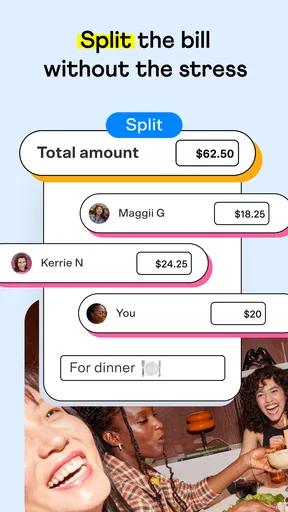
Imagine four friends ordering takeout for a movie night. One person pays, then shares the total and each person’s agreed portion. I would send my share while everyone is together, check the recipient and amount, and wait for the transaction to show a clear result. That routine avoids the next-day message asking who still owes what, while also giving the group a chance to catch a mistaken split before anyone leaves.
For a restaurant bill, I would not assume that a quick transfer replaces sorting out tax, tip, or unequal orders. The group should agree on the amount first. Venmo makes the reimbursement convenient; it does not calculate what would be fair for a table with different meals or preferences. That small bit of coordination is often the difference between a smooth payment and an awkward follow-up.
Social features and privacy choices
The transaction feed is the feature that most clearly separates Venmo from a plain bank transfer. Some people enjoy seeing payment notes and reacting to friends’ activity, while others would rather keep financial interactions quiet. I recommend checking the audience choice before sending, particularly if you are paying for something personal or do not want a transaction to be part of a social experience.
I also keep payment notes practical and avoid putting sensitive details into a casual message. A note can help friends recognize what a payment covers, but there is rarely a reason to include private information. The ability to manage who sees transactions is useful, though I would not confuse a visibility setting with account security: I still use the app’s available lock options and take care with my phone itself.
What the card changes—and what it does not
The physical Venmo card can be useful if I want to spend from my Venmo balance at a retailer that accepts Mastercard. That is a different use from sending money to a friend, so I would think of it as an additional way to use the balance rather than the reason to install the app. It may suit someone who wants to keep a particular pot of spending separate, but it is not a replacement for choosing the right card or account for every purchase.
Before relying on a card for an outing, I would make sure I understand which balance or funding arrangement I intend to use and have another payment method available. That is not a criticism unique to Venmo; it is a sensible habit whenever a purchase depends on a particular payment source. A peer-to-peer app is most convenient when it complements, rather than becomes, your only way to pay.
Who is likely to get the most from it
Venmo is a good fit for people who regularly split costs with friends, family, or roommates and want a familiar way to reimburse one another. It is particularly handy for repeated small exchanges—shared groceries, group gifts, or a friend who picks up tickets—because those situations benefit from a clear payment record and less reliance on cash. The strongest case is a social circle where the people involved already use the app.
I would skip it, or at least avoid making it my main payment option, if I need a tool for formal invoices, business accounting, or detailed household budgeting. I would also choose another method when a recipient cannot or does not want to use Venmo, or when a weak connection makes it hard to confirm a time-sensitive payment. The app can make a familiar exchange easier, but it cannot make an unsuitable payment arrangement fit.
My connectivity verdict
Overall, I see Venmo as a convenient mobile option when I have a steady connection, know who I am paying, and want to settle a person-to-person expense without cash. My most useful habits are to confirm the recipient and amount, check the outcome before repeating a transfer, and keep payment notes and visibility choices deliberate. These small checks preserve the speed without turning speed into carelessness.
If your everyday payments are mostly shared meals, household costs, and group plans, Venmo can make settling up feel less like a chore. If you need dependable access in places with unreliable service, prefer private, non-social transfers, or mainly pay businesses, another method may suit you better. I would keep it as a practical option for the right circle and situation, rather than treating it as a universal replacement for cash, cards, or banking tools.
Pros
- User-friendly interface for easy navigation.
- Instant transfers between Venmo users.
- Integrated with popular apps for convenience.
- Customizable privacy settings for transactions.
- Social feed for sharing payments and comments.
Cons
- Transaction fees for credit card payments.
- Limited international use outside the U.S.
- Privacy concerns with default public settings.
- No robust buyer protection for transactions.
- Requires a bank account or card for setup.
FAQs for Venmo
What is Venmo and how does it work?
Venmo is a mobile payment service that allows you to easily send and receive money from friends and family. It works by linking your bank account, debit, or credit card to the app. Users can transfer funds, split bills, and make purchases at participating merchants or simply send money to others with a Venmo account.
Is Venmo safe to use for transactions?
Venmo uses encryption to protect your financial information and offers several security features, such as PIN codes and multi-factor authentication. However, it's important to only transact with people you trust and to monitor your account regularly for any unauthorized activity to ensure the highest level of security.
Are there fees associated with using Venmo?
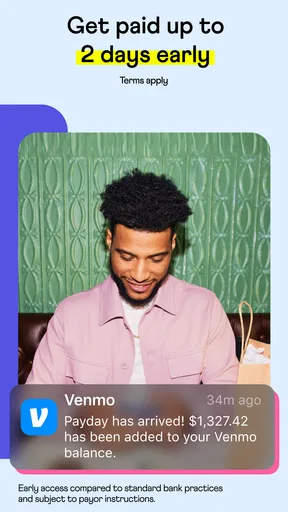
Venmo is free to use when sending money from a linked bank account or debit card. However, if you use a credit card to send funds, there is a 3% fee per transaction. Instant transfers to your bank account also incur a small fee, while standard transfers are free and take 1-3 business days.
Can I use Venmo for international transactions?
No, Venmo is currently only available for transactions within the United States. Both the sender and receiver must be located in the U.S., and you must have a U.S.-based bank account to use the service. For international transactions, consider other services like PayPal.
What are the social features of Venmo?
Venmo includes social features that allow users to share payment activities on a social feed. You can like and comment on your friends’ transactions, similar to a social media platform. You can also adjust privacy settings to control who can see your transactions, ensuring your financial activities remain as private or public as you desire.


